How to review your training history
On the Command Center, tap History.
This is the permanent record of your finished training. It holds two kinds of entry, newest first:
- finished workouts
- cardio sessions logged on their own
The History Ledger card above the tile opens your most recent session.
Workout rows and cardio rows behave differently
A workout row opens a new screen, Workout Detail.
A cardio row opens in place. The details expand below the row. You stay on the History screen.
Only one cardio row is open at a time.
Cardio rows carry a tag: STEP-TRACKED CARDIO, MANUAL CARDIO, or CARDIO SESSION.
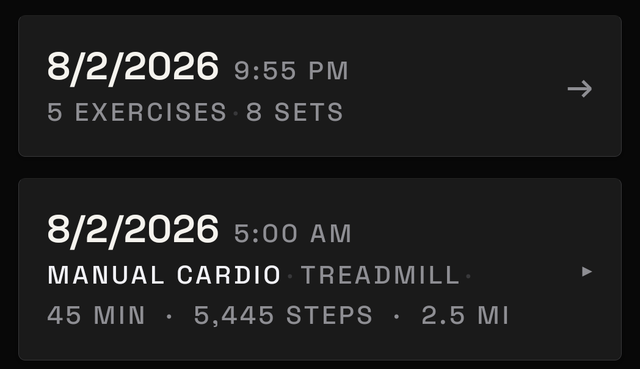
What a workout row shows
Each workout row shows the date and time, then:
- the number of exercises
- the number of sets
- the number of recoveries
- the duration
The star rating appears if one is set.
Inside a workout
Tap a workout row to open Workout Detail.
Rating sits at the top. Tap a star to set it, or tap it again to clear it. It saves immediately.
SESSION REPORT appears when sets were logged. It shows tiles including MAX LOAD, WORKING SETS, WORKING VOLUME, and DURATION.
Tap any tile for its definition. Tap Close to dismiss it.
Below that is every exercise and every set logged. Recovery logged for that session appears under Recovery.
At the bottom: plan your next workout, start the same workout again, save it as a routine, share it, or amend it.
Filter by gym
A row of gym chips appears only if a gym was recorded on at least one workout. Tap All Gyms or a gym name.
Cardio sessions have no gym. They appear only under All Gyms. Filtering to one gym hides them.
Delete a workout or a cardio session
Press and hold an entry to delete it. MesoMetric asks for confirmation first.
Delete all training history sits at the bottom, in the All Gyms view only. It removes every past workout and every cardio session.
Nothing else is removed. Check-ins, body logs, meals, weights, measurements, routines, foods, and settings are kept.
If the list is empty
Before the first finished session:
Filtering to a gym with nothing recorded shows:
Tap All Gyms to show everything again.