How to add exercises and planned sets to a routine
- On the Command Center, tap Routines.
- Tap Edit on the routine you want to work on.
A set is one group of lifts you do in a row, and you rest after each set. A rep is one lift.
Add exercises
- Tap + Add Exercise.
- Find the exercise.
- Tap it.
The exercise is added to the routine. Repeat for each exercise.
MesoMetric saves changes as you make them. There is no save button. Tap Done when you finish.
Plan your sets
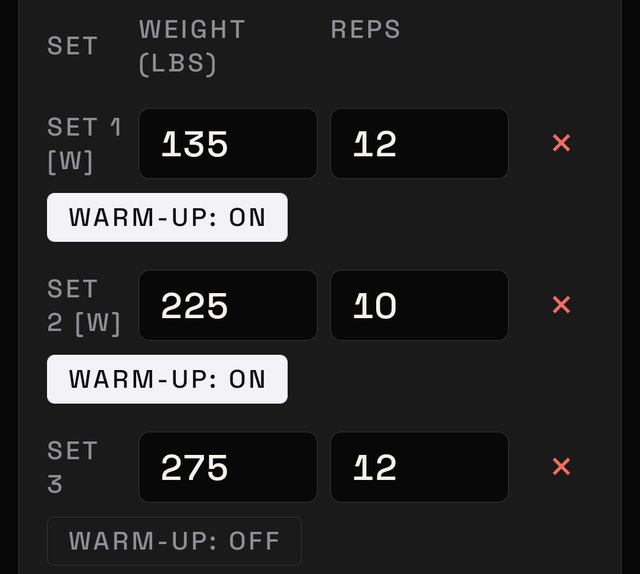
A small table sits under each exercise, with Set, Weight, and Reps.
- Tap + Add set to add a row.
- Enter the weight you plan to lift.
- Enter the reps you plan to do.
- Add a row for each set.
Each new row copies the one above it.
A warm-up set is a lighter set done to get ready. Tap Warm-up: OFF on that row to change it to Warm-up: ON.
Tap the × next to a row to remove it.
Planks and vacuums
These use rounds instead of sets. Tap + Add round, then enter how many seconds you plan to hold.
Cardio
Cardio means a treadmill, a bike, or a rowing machine.
Cardio exercises show boxes for that machine. Which boxes appear depends on the machine:
- duration
- speed
- incline, which is how steep the treadmill tilts
- distance
- steps
- level, which is the machine setting that makes it harder
These save as soon as you tap elsewhere. There is no button to add rows.
Move or remove exercises
Each exercise has four options:
- Move to top
- Move up
- Move down
- Remove
If something doesn't save
A short message appears, such as "Could not add set".
The routine is unchanged. Repeat the step.